Buying a home with an existing Savant system can be a benefit, but the system history rarely transfers as neatly as the property deed. Owners may inherit touchscreens, remotes, lighting scenes, audio zones and network equipment without knowing who controls the account, where project records are stored or which devices have already been replaced.
A successful takeover begins with documentation. The objective is to understand what exists, what still works, what can be supported and what should change before anyone promises a repair or upgrade. This checklist helps homeowners, estate managers and property professionals prepare for an efficient Savant assessment.
Begin with ownership and account access
Confirm who owns the Savant account and which email addresses or mobile devices are associated with the system. Do not send passwords or security codes by ordinary email. Instead, identify the authorized owner and be prepared to complete any manufacturer-approved transfer or verification process.
- Property owner or authorized representative
- Current Savant account email
- Names of prior integrators, builders or estate managers
- Approximate installation and major upgrade dates
- Available proposals, invoices, drawings and equipment schedules
If the original integrator is still available, request the records the homeowner is entitled to receive. A system may still be serviceable without a perfect archive, but missing ownership and project information can increase diagnostic time.
Create a room-by-room operating inventory
List what the system is expected to control in each room. Include televisions, streaming sources, audio zones, lighting, shades, climate, pools, gates and security-related interfaces. Then note what actually happens today. “The family-room remote is slow” is more useful when paired with the source, time of day and exact symptom.
Photograph model labels where they are safely accessible, but do not unplug rack equipment simply to read a label. Record which remotes, touchscreens and apps are in regular use. Note equipment that is missing, intermittent or intentionally disconnected.
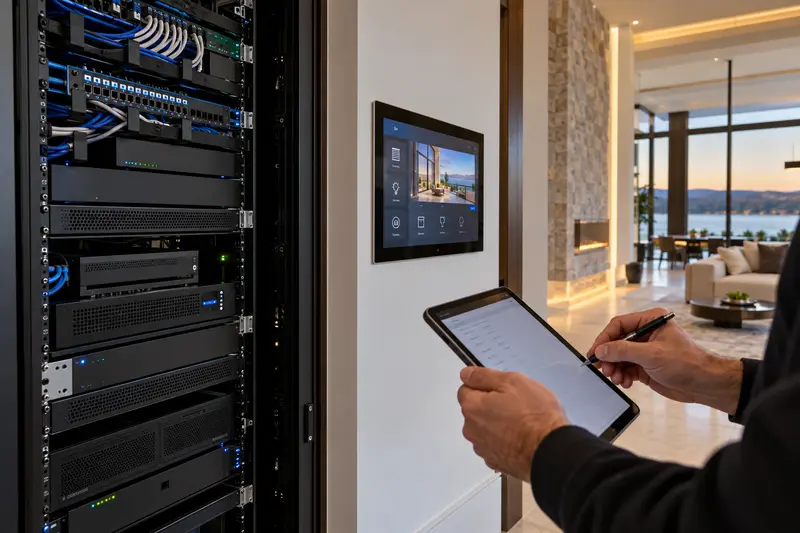
Document the equipment rack and network
Savant performance depends on the network and on the sources connected to the control system. A takeover should therefore include the router, switches, wireless access points, power protection and rack condition—not only the Savant host.
- Internet provider and modem or gateway
- Router, managed switches and wireless access points
- Savant host, controllers and user interfaces
- Audio matrices, amplifiers and video-distribution hardware
- Streaming devices, television models and source locations
- UPS units, surge protection and rack ventilation
Unlabeled cables, unmanaged switches and consumer network extenders can make a control problem appear random. A stable takeover often begins by correcting the infrastructure that every connected subsystem relies on.
Separate symptoms from assumptions
Homeowners naturally describe the device that appears broken, but the visible symptom may start elsewhere. A television that will not turn on from the Savant app could involve network connectivity, a driver, source control, power, firmware or the display itself. A slow lighting command may reflect a lighting-system problem rather than the Savant interface.
For each issue, record the command attempted, room, device, result, frequency and whether manual control still works. This gives the technician a reproducible starting point and helps distinguish one failed component from a wider system condition.
Identify connected platforms and responsibility
Many Savant homes also include Lutron lighting or shades, enterprise Wi-Fi, Sonos or another audio platform, surveillance, alarm systems, gates and climate controls. Document the brand and current service provider for each. A takeover proposal should state which systems the integrator will support directly, which require coordination and which remain outside the scope.
This responsibility map matters after the first visit. If a future issue crosses the network, automation and security boundaries, the owner should know who leads diagnosis instead of calling several vendors without a plan.
Decide what success means
Not every takeover needs a complete redesign. One homeowner may want reliable television and music control. Another may be planning a renovation and needs new lighting, shades, networking and interfaces. Define the priority rooms, must-have functions, unacceptable failures and expected timeline.
Common takeover outcomes
- Stabilize: correct urgent network, power, control and programming issues.
- Restore: bring supported rooms and functions back to reliable operation.
- Modernize: replace aging interfaces, sources or infrastructure in phases.
- Expand: add rooms, lighting, shades, audio, video or voice control.
- Replace: develop a planned transition when the existing system is no longer practical to support.
Expect a diagnostic phase before a final recommendation
A responsible integrator may need onsite time to inspect, connect, test and document before quoting a definitive repair. The system’s age, software access, product status, network condition and prior modifications all affect what is possible. A diagnostic visit should produce clearer findings and next actions, not a vague promise that every component can be recovered.
Prepare for long-term service
After stabilization, request an updated equipment list, network summary and explanation of the supported scope. Ask how service requests should be submitted, what remote access is enabled and what information the provider keeps. Accurate records reduce downtime and prevent the next service call from beginning at zero.
Sentry Audio Video is an authorized Savant dealer and provides assessment, programming, upgrade and takeover support in South Florida. Learn about Savant service and system takeovers, explore new Savant system design, or request a service consultation. Call (561) 717-3280 with the property location and the most important symptoms.