A Control4 system can be programmed well and still be difficult to own if the equipment rack was treated as leftover space. Rack size, ventilation, power, labeling and service clearance affect reliability for years. These decisions are easiest to solve before millwork, electrical work and mechanical systems are finalized.
This guide focuses on the technology space rather than the broader automation design. For complete system design, installation and equipment sales, visit Sentry Audio Video’s Control4 dealer and installation page or call (561) 717-3280.
Size the rack for the finished system, not the first equipment list
A preliminary list may omit network switches, power management, audio distribution, video sources, surveillance equipment, control processors, patch panels and shelves. It may also ignore vertical spacing, cable management and ventilation gaps. A rack that appears generous on paper can become crowded as the design develops.
Prepare an elevation showing every device, its rack-unit height and any required clearance. Reserve reasonable capacity for documented future needs rather than filling every position on day one. Expansion space is especially valuable in large homes where additional rooms, cameras or sources may be added later.
Choose a location that technicians can reach
The technology room should allow a technician to work safely without moving stored furniture or blocking a hallway. The rack needs front and rear access, adequate lighting and a practical path for replacement equipment. Confirm door width, turning radius and ceiling height before the rack arrives.
A closet that also contains household storage, plumbing or equipment producing heat and moisture is usually a poor choice. Avoid locations exposed to leaks, salt air, dust or direct sun. If the rack must be in a finished area, coordinate doors and panels that preserve access rather than sealing the equipment behind decorative construction.
Plan heat removal as an operating requirement
Control processors, amplifiers, network switches, recorders and other electronics create heat continuously. A closed room can remain warm even when the rest of the house is comfortable. Excess temperature can shorten equipment life and cause intermittent problems that are difficult to diagnose.
Estimate the heat load from the actual equipment schedule and coordinate with the mechanical team. Depending on the room and system, the solution may involve passive ventilation, exhaust, a dedicated return or conditioned air. Do not assume a louvered door alone will solve a dense equipment load. Temperature monitoring can provide an early warning after the home is occupied.
Give power quality and shutdown behavior a design
The rack needs dedicated, clearly identified electrical service sized for the connected load and future capacity. Surge protection, power conditioning and battery backup serve different purposes. A UPS may keep critical network and control components operating through a short interruption, but it must be sized and maintained appropriately.
Decide which devices require backup and which should shut down. Large amplifiers may not belong on the same battery strategy as the router and controller. If the residence has a generator, coordinate transfer behavior and test how the system recovers. Remote power management can help support teams restart approved devices without an unnecessary visit.
Separate and support cables correctly
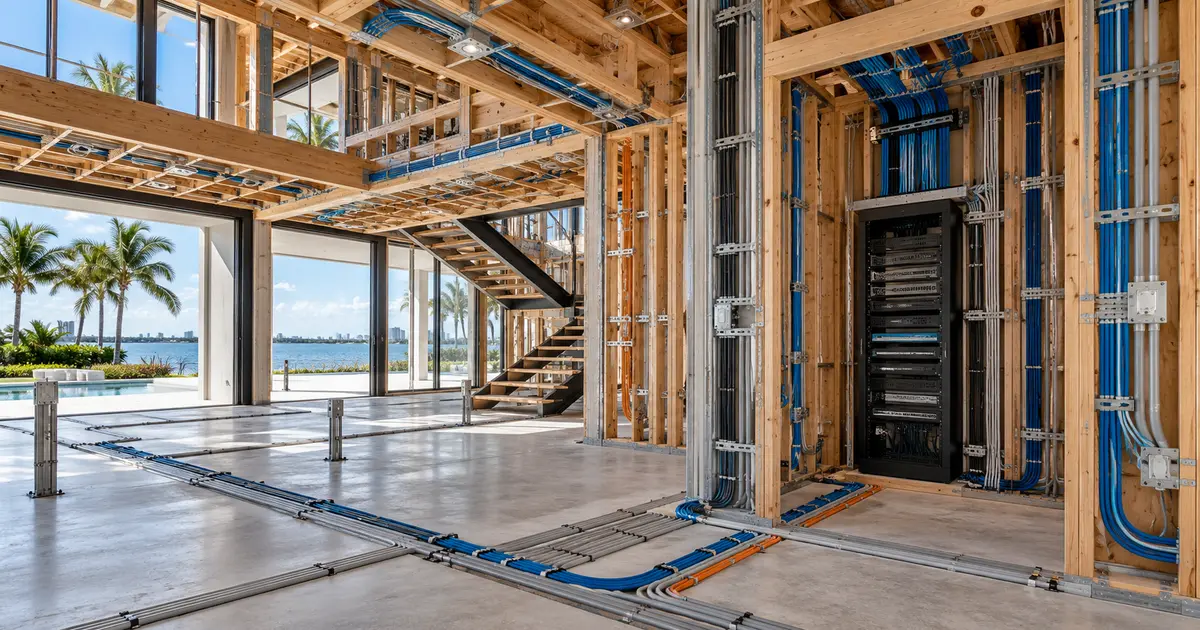
Cables should enter the rack through planned pathways with appropriate bend radius, support and separation. Leave service loops where useful without creating tangled bundles that obstruct airflow. Terminate network and low-voltage cabling on labeled patch panels instead of running building cables directly into devices whenever practical.
Structured pathways are part of the rack design. Coordinate conduit size, pull strings, sleeves, firestopping and routes before walls close. Learn more about structured cabling and fiber planning for new construction and renovation.
Label for service, not just installation day
Every cable, port, power connection and device should be identifiable using a consistent scheme. Labels should correspond to drawings and the programming documentation. A technician should be able to trace a television, access point or speaker zone without unplugging several cables to find the right one.
Store current rack elevations, network diagrams, device lists and configuration records with the project documentation. Update them after changes. Good records reduce troubleshooting time and make a future upgrade or system takeover safer.
Preserve room for service and replacement
Equipment eventually needs cleaning, firmware service or replacement. Sliding shelves, rear rack rails and proper cable length help devices move without disturbing unrelated systems. Heavy components require secure mounting and appropriate rack hardware. The floor and wall structure should support the planned installation.
Confirm that filters, fans and UPS batteries can be reached. A design that requires dismantling millwork for ordinary maintenance creates avoidable cost and downtime. Photograph concealed pathways and backing before drywall closes.
Coordinate the rack with the Control4 experience
The rack is not separate from the user experience. Network stability affects touchscreens, mobile apps, streaming, cameras and lighting commands. Audio and video sources need reliable distribution. Power recovery affects whether the home returns to a predictable state after an outage.
Review the equipment space alongside the automation scope, whole-house audio, video distribution, security and Wi-Fi plan. The rack elevation should match the final rooms, loads and control features—not an early placeholder.
Questions for the construction meeting
- Is there enough rack capacity and documented expansion space?
- Can technicians reach the front, rear and sides safely?
- How will heat be removed under full operating load?
- Which devices receive battery or generator-backed power?
- Are conduits, sleeves and cable pathways coordinated?
- Who maintains the rack elevation and labeling schedule?
- Can large equipment be replaced after finishes are complete?
Make the technology room part of the design
Sentry Audio Video is an authorized Control4 dealer and designs complete automation, network and audio-video systems. Early rack coordination protects reliability, simplifies service and gives future upgrades a workable foundation.
Schedule a Control4 design consultation: call (561) 717-3280 or contact Sentry Audio Video.
Planning a Rack for a Kaleidescape System?
For a new movie system, player or server upgrade, repair assessment or takeover of an existing installation, explore Sentry’s local Kaleidescape services.
From our Google reviews
“They recently installed a Control4 system at both my home and my workplace, and the entire experience was flawless from start to finish.”
Control4 installation — home and workplace
Google review excerpt