This guide compares Lutron HomeWorks and Control4 lighting for Boca Raton custom homes, renovations and waterfront estates. It is an informational decision page—not Sentry’s primary Lutron service page. For Lutron design, installation, repairs, upgrades, Ketra, Palladiom and shades, use the main Lutron dealer guide for Boca Raton.
A beautiful home can still feel unfinished when lighting control is an afterthought. Too many wall switches, inconsistent dimming, and separate apps for shades, audio, and climate turn sophisticated spaces into a daily inconvenience. When comparing Lutron vs Control4 Lighting, the right answer depends less on a feature checklist and more on how you want your property to function for years to come.
Both brands are respected names in professionally designed smart homes. Both can deliver elegant keypads, personalized scenes, app-based control, occupancy response, and integration with a larger automation system. The meaningful difference is where each platform begins. Lutron is fundamentally a lighting and shade-control specialist. Control4 is a whole-property automation platform that also offers lighting control.
That distinction should guide the conversation from the first design meeting.
Lutron vs Control4 Lighting: The Core Difference
Lutron is often the natural choice when lighting quality, keypad design, dimming performance, and motorized shade integration are central to the project. Its systems are engineered around the details that homeowners notice every day: a light fading smoothly, a scene responding instantly, a keypad that is intuitive for guests, and shades that move in coordination with the sun and the room’s use.
Control4 is often the stronger starting point when the owner wants one primary interface for lighting, audio, video, surveillance, security, climate, pool features, and more. Its lighting products can be a strong fit in a broader Control4 ecosystem, particularly when centralized control and a unified user experience are the priority.
Neither approach is automatically better. A waterfront residence with expansive glass, layered architectural lighting, and extensive motorized shades may benefit from a Lutron-centered lighting design. A home or business where audio/video, access control, cameras, and environmental systems must be managed from one familiar interface may lean toward Control4. In many premium projects, the most refined answer is not an either-or decision: Control4 can provide whole-home control while Lutron handles lighting and shades.
Where Lutron Stands Apart
Lighting is more than turning fixtures on and off. It affects the color and texture of artwork, the way a kitchen works after sunset, the comfort of a bedroom at night, and the overall feeling of a room. Lutron’s reputation was built on managing those details with consistency.
Its higher-level systems, including HomeWorks, are designed for substantial residences and complex lighting loads. They support sophisticated scene programming, architectural keypads, centralized panel options, and coordinated shade control. This can reduce wall clutter while giving each room a polished, purposeful control point.
Lutron is also particularly compelling for properties with significant daylight-management needs. In South Florida, motorized shades are not simply a decorative upgrade. They help manage glare, privacy, heat gain, and the intense afternoon sun that can make a beautiful room less enjoyable. With Lutron, lighting and shading are designed as connected parts of the same experience. A “Good Morning” scene can gradually raise shades and bring lights to a comfortable level. An “Entertain” scene can lower selected shades, illuminate artwork, and set the right mood across indoor and outdoor spaces.
Another advantage is ecosystem depth. Lutron works with a wide range of fixture types and control methods, but the final performance still depends on proper load assessment, fixture compatibility, and programming. Premium lighting requires more than premium hardware. It requires a design team that understands how the fixtures, drivers, dimmers, keypads, and control system will behave together.
Where Control4 Has the Advantage
Control4 approaches lighting as one part of a complete automation experience. Its value becomes especially clear when a homeowner wants one interface to manage the property rather than a collection of separate control methods.
From a Control4 touchscreen, keypad, remote, or mobile app, a single command can manage lighting alongside music, video, climate, shades, door locks, cameras, and other connected systems. For example, an “Away” command can turn off selected lights, lower shades, stop distributed audio, arm security features, and notify the household that the property has entered its departure mode. That kind of coordinated response is where Control4 excels.
Control4 lighting hardware also offers a clean, consistent aesthetic, with dimmers, switches, keypads, and configurable buttons that can be tailored to the property. It is a practical option for projects where a unified Control4 interface matters more than pursuing the deepest possible lighting-and-shade specialization.
For commercial settings, Control4 can be appealing when simple centralized control supports daily operations. A restaurant, office, showroom, or hospitality environment may benefit from predefined opening, presentation, event, and closing scenes that coordinate lights with distributed audio and displays. The appropriate design depends on the building’s requirements, code considerations, and the level of control expected by staff.
Keypads, Scenes, and Daily Use Matter More Than Apps
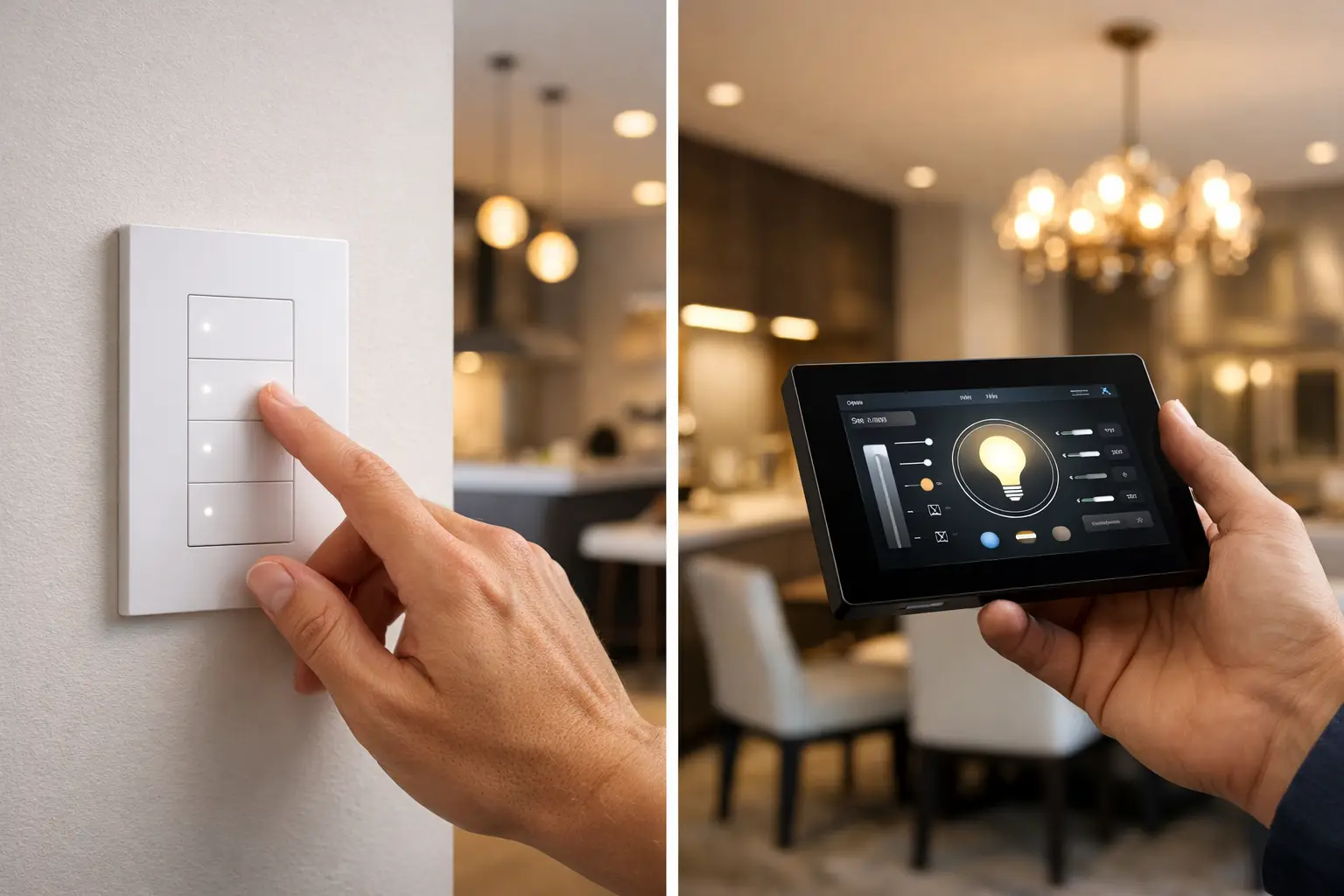
A lighting system is only successful if it feels natural on an ordinary Tuesday night. Apps are useful, especially when away from the property, but the most-used controls are often physical keypads located where people enter a room, walk down a hallway, or settle in for the evening.
Lutron keypads are widely valued for their tactile feel, engraved button labels, and dedicated lighting and shade functions. They can make a complex home easy to operate without requiring anyone to search through an app. Control4 keypads offer a similarly refined path, with customizable buttons that can trigger lighting scenes or broader automation commands.
The better keypad is the one designed around the way your household lives. A family may want simple labels such as “Kitchen,” “Dining,” “All Off,” and “Goodnight.” An experienced homeowner may prefer scene labels such as “Welcome,” “Relax,” “Dinner,” and “Outdoor.” In either case, the design should eliminate guesswork rather than add another layer of technology to manage.
Reliability Is a Design and Service Question
Both Lutron and Control4 are professional platforms with established dealer networks and long-term product strategies. Still, reliability is not determined by brand name alone. It is shaped by the design, infrastructure, installation quality, programming discipline, and support plan behind the system.
A well-executed project begins with lighting plans, fixture schedules, control locations, low-voltage pathways, equipment placement, and network requirements considered early in construction or renovation. Waiting until finishes are selected can limit keypad placement, reduce control options, and create avoidable compromises.
It is also wise to plan for future service. The home should have organized equipment racks, labeled wiring, documented programming, and a clear point of contact when priorities change. A new outdoor entertaining area, revised room layout, or added security feature should not force the owner to start over. Professional integration gives the property room to evolve.
When a Combined Lutron and Control4 System Makes Sense
For many custom homes, combining the two platforms provides an exceptionally strong result. Lutron can manage the lighting and shades, while Control4 becomes the property-wide interface for entertainment, security, climate, cameras, and other connected systems. The homeowner gains the lighting precision associated with Lutron while retaining a central Control4 experience across the full property.
This approach is especially valuable in large residences with theaters, guest suites, outdoor living areas, multiple entertainment zones, gated entry, surveillance, and architectural shading. It does require careful engineering. The systems must be programmed to communicate clearly, scenes must have a defined owner, and every control point should behave predictably. A poorly planned hybrid can feel fragmented. A properly integrated one feels deliberate.
There are also cases where one platform is the better fit. If the project is primarily focused on lighting and shades, Lutron may be the direct, elegant solution. If the property already has an established Control4 environment and lighting needs are straightforward, expanding within Control4 may be sensible. The goal is not to select the most equipment. It is to select the right control architecture.
Questions to Settle Before You Choose
Before selecting Lutron, Control4, or a combination of both, consider how the property will be used. Are motorized shades a major part of the design? Do you want lights to react to security, climate, entertainment, or occupancy events? Is a theater, pool area, guest house, or outdoor kitchen part of the larger plan? Will staff, guests, children, or multiple family members need simple controls that work without training?
Also consider the finish level. In a luxury residence, keypad appearance, button engraving, faceplate finishes, and wall-box locations influence the final result as much as the technology behind the wall. These details should be coordinated with the interior designer, architect, builder, and lighting designer before installation begins.
A thoughtful consultation can translate those preferences into a system that performs cleanly from day one. Sentry Audio Video designs lighting control as part of the complete environment, accounting for entertainment, security, networking, shading, and the way each space will actually be used. The right choice is the one that makes a complex property feel calm, intuitive, and fully under control.
Continue your research: Explore our complete circadian and smart-lighting guide, review Lutron HomeWorks installation and service, or compare options with a Control4 dealer in Boca Raton.
Boca Raton • Palm Beach County
Choosing between Control4 and Lutron?
The right answer depends on panel wiring, load types, keypad locations, shade scope and how the property will be serviced. Sentry can review the plans or survey the existing Boca Raton home and define one coordinated lighting and automation scope.
- Family-owned • 25 years of experience
- Florida low-voltage license EF20001874
- New construction, retrofit, repair and takeover work